Cegos: A Strategic Approach to Minimalist Techno Typography
In the landscape of modern design, typography is rarely just about legibility; it is a primary vehicle for brand identity and user experience. When selecting a typeface, professionals often face a trade-off between distinctiveness and versatility. Cegos resolves this tension by offering a minimal, techno-inspired aesthetic that functions effectively across a wide spectrum of applications. For designers, marketers, and content creators, integrating Cegos into a workflow requires understanding its geometric precision and how it interacts with other visual elements.
This article explores the practical implementation of Cegos in professional projects. It moves beyond simple description to examine how this font fits into broader creative processes, from initial concept development to final execution. By treating typography as a functional component of a larger system, users can leverage Cegos to enhance clarity, convey technical authority, and maintain visual consistency.
Understanding the Technical Architecture of Cegos
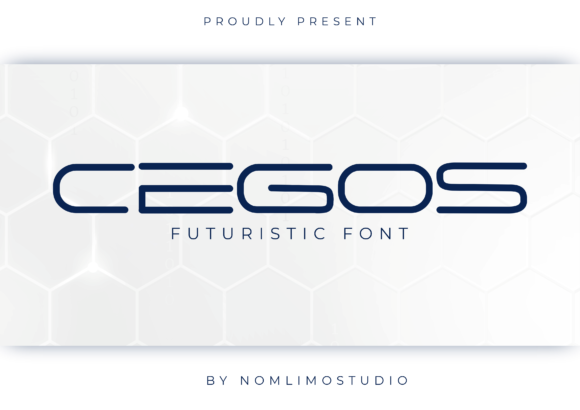
To use Cegos effectively, one must first understand its structural characteristics. The font belongs to the category of display typefaces designed with a strong emphasis on geometry and negative space. Its "techno" classification implies a connection to industrial design, digital interfaces, and futuristic aesthetics. The letters are constructed with clean lines and uniform stroke weights, which eliminates the organic variability found in serif or handwritten fonts.
This structural rigidity offers specific advantages in workflow efficiency:
- Predictability: Because the letterforms are highly regular, they behave consistently across different sizes and mediums. This reduces the need for manual kerning adjustments in many layout scenarios.
- Scalability: The minimal design ensures that the font remains readable even at small sizes, making it suitable for both large-format displays and mobile interface headers.
- Neutrality: While distinctive, Cegos does not carry heavy emotional baggage. It serves as a neutral canvas that allows accompanying imagery or copy to take center stage without competing for attention.
For professionals in fields such as architecture, software development, or tech journalism, these traits make Cegos an ideal candidate for headings, labels, and data visualization titles. It signals precision and modernity without requiring extensive graphic embellishment.
Integration into Pre-Production Planning
The value of a typeface like Cegos is determined long before the first pixel is placed. During the planning phase of a project, establishing a clear typographic hierarchy is crucial. Cegos should be evaluated against the project’s core objectives. If the goal is to communicate speed, innovation, or structural integrity, Cegos aligns naturally with these concepts.
When preparing assets, consider the following integration points:
- Brand Guidelines Definition: Define strict rules for Cegos usage early. Specify minimum sizes, line heights, and color contrasts. Since the font is minimal, poor contrast can render it illegible. Establishing these parameters prevents rework during the design phase.
- Pairing Strategy: Cegos performs best when paired with complementary sans-serif body text. Look for fonts with higher x-heights and more open counters to balance the starkness of Cegos. Avoid pairing it with other geometric fonts that share similar proportions, as this can create visual monotony.
- Medium Assessment: Determine where the font will live. Is it for print, web, or environmental graphics? The techno aesthetic may require slight adjustments in weight or spacing depending on the resolution of the output device.
By addressing these factors upfront, teams can avoid common pitfalls such as inconsistent branding or readability issues. This preparatory work ensures that Cegos enhances the message rather than distracting from it.
Execution and Layout Implementation
During the active creation phase, the focus shifts to application. Cegos is a display font, meaning it is intended for short bursts of text rather than long-form reading. Misusing it for body copy is a common error that leads to user fatigue. Instead, reserve Cegos for headlines, pull quotes, navigation menus, and UI components like buttons or tags.
Practical Tip: Utilize tracking (letter-spacing) to enhance the techno feel. Increasing the space between letters can give the text a more expansive, airy quality, which complements the minimalist nature of the font. However, be cautious not to over-expand, as this can break word recognition.
In digital product design, Cegos can serve as a powerful tool for information architecture. Use it to label categories, sort options, or status indicators. Its sharp edges and clean lines mirror the logic of code and databases, creating a subconscious link between the visual interface and the underlying technology. This alignment improves usability by reinforcing the context of the content.
For marketing materials, such as landing pages or promotional banners, Cegos helps establish immediate credibility. In sectors like fintech, cybersecurity, or engineering, a typeface that looks engineered and precise builds trust. It suggests that the company values accuracy and detail. Ensure that the background colors provide sufficient contrast. Light gray backgrounds with dark text, or vice versa, work well. Avoid low-contrast combinations that diminish the font’s impact.
Collaboration and Asset Management
Typography is rarely a solitary endeavor. In team environments, managing font assets efficiently is critical for maintaining consistency. When working with developers, designers, or external agencies, providing clear specifications for Cegos is essential.
Consider the following workflow adjustments:
- Web Implementation: If using Cegos on the web, ensure proper licensing for web embedding. Convert the font to web-friendly formats (WOFF2) to optimize load times. Test the font rendering across different browsers, as some may handle geometric shapes differently.
- Version Control: Keep track of font versions. Minor updates to a typeface family can alter metrics slightly, potentially breaking layouts. Document the exact version used in each project to facilitate future updates or audits.
- Accessibility Checks: Verify that the chosen weight and size meet WCAG (Web Content Accessibility Guidelines) standards. While Cegos is clear, its minimalism means it lacks the serifs that assist some readers in distinguishing character shapes. Ensure sufficient size and contrast to support inclusive design practices.
Effective communication with stakeholders also plays a role. Explain why Cegos was chosen—not just because it looks cool, but because it supports the project’s functional goals. Demonstrating the link between aesthetic choice and user outcome strengthens the case for the design decision.
Long-Term Utility and Adaptability
One of the strengths of Cegos is its adaptability over time. Trends in design shift rapidly, but the principles of minimalism and functionality endure. A project launched with Cegos today is likely to remain visually relevant for several years, provided it is implemented correctly. This longevity reduces the need for frequent redesigns, saving resources in the long run.
However, sustainability in design also involves ethical considerations. Ensure that the font license permits all intended uses, including commercial projects, modifications, and distribution. Using unauthorized fonts can lead to legal complications that disrupt workflows and damage reputation.
As projects evolve, Cegos can be repurposed. A header font used in a website can be adapted for presentation slides, business cards, or social media graphics. This cross-platform consistency reinforces brand recognition. Just remember to adjust the scale and context appropriately. What works as a hero banner headline may need to be simplified for a small icon label.
Conclusion on Practical Application
Cegos is more than a stylistic choice; it is a functional asset for professionals who prioritize clarity and modern aesthetics. By understanding its geometric nature and integrating it thoughtfully into pre-production planning, execution, and collaboration, users can maximize its potential. Whether you are building a digital product, designing a marketing campaign, or organizing information, Cegos provides a reliable foundation for effective communication.
Start by defining your needs clearly. Select Cegos where precision and minimalism add value. Implement it with attention to contrast, pairing, and accessibility. Manage it carefully within your team’s workflow. Through disciplined application, this minimal techno font can help your projects stand out with confidence and professionalism.