Ghosting: Why This Graffiti-Styled Display Font Demands Careful Handling
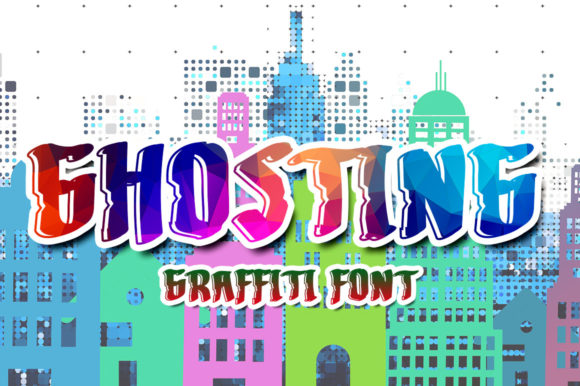
When you see the word Ghosting, your mind might immediately jump to the awkward social phenomenon of disappearing from someone’s life without explanation. However, in the world of typography and graphic design, Ghosting is something entirely different—and arguably much more desirable. It is a cool, graffiti-styled display font that captures the raw energy of street art. With its bold lines, urban aesthetic, and distinct character, it brings an immediate sense of attitude to any project.
But here is the catch: just because a font looks edgy and modern doesn’t mean it is easy to work with. Many designers, marketers, and small business owners dive into using display fonts like Ghosting without fully understanding their limitations. The result? Designs that look amateurish, text that is impossible to read, or branding that fails to communicate effectively. If you are considering adding this typeface to your t-shirts, sportswear lines, logos, or advertisements, you need to understand not just how cool it looks, but how to use it correctly.
The Allure of Street Art Aesthetics
Why is Ghosting so popular? It taps into a cultural moment where authenticity and rebellion are highly valued. Whether you are a freelancer designing a logo for a skate shop, a blogger creating eye-catching headers, or an entrepreneur launching a new clothing brand, the "street" vibe offers a shortcut to looking relevant. The font’s heavy weight and artistic flair suggest confidence and creativity. It works exceptionally well for short bursts of text—think headlines, posters, album covers, and apparel graphics.
However, the very qualities that make Ghosting attractive also make it tricky. Its decorative nature means it is not designed for long paragraphs or subtle messaging. Treating it like a standard body font is one of the most common mistakes creators make. When you try to force a graffiti-style display font into a context where clarity is key, you risk confusing your audience rather than engaging them.
Mistake #1: Overusing Display Fonts in Body Text
The biggest error people make with Ghosting is assuming it can replace standard sans-serif or serif fonts for general reading. Display fonts are meant to be glanced at, not read deeply. If you use Ghosting for a paragraph of text on a website or a brochure, you will create visual fatigue. Your readers will struggle to follow the words, leading to higher bounce rates on your site or discarded flyers.
How to fix this: Use Ghosting strictly as a headline or accent font. Pair it with a clean, neutral typeface for your body copy. For example, if you are designing a poster for a music festival, let Ghosting shout the event name in large letters, but use a simple Helvetica or Roboto for the lineup details and ticket information. This contrast creates hierarchy and ensures your message is both stylish and legible.
Mistake #2: Ignoring Licensing and Usage Rights
Another critical oversight involves the legal side of downloading and using fonts. Not all fonts labeled as "free" are free for commercial use. Some may be restricted to personal projects only, meaning you cannot use them on t-shirts you plan to sell or logos for your business. Using a font like Ghosting without the proper license can lead to costly legal issues, fines, or having to rebrand everything you have created.
How to fix this: Always check the license agreement before you download. Look for terms like "commercial use," "personal use only," or "OFL" (Open Font License). If you are unsure, contact the foundry or designer directly. Investing a few dollars in a commercial license is far cheaper than paying damages later. For entrepreneurs and small business owners, this step is non-negotiable.
Mistake #3: Poor Contrast and Color Choices
Graffiti fonts often feature intricate details, drips, or uneven edges. These details can get lost if you do not pay attention to contrast. A common mistake is placing Ghosting on a busy background or using a color combination that lacks sufficient contrast. For instance, light gray text on a white background will disappear, while neon green on bright yellow will vibrate uncomfortably for the viewer.
How to fix this: Test your design in black and white first. If the text is still distinguishable, you likely have enough contrast. When choosing colors, consider the mood you want to convey. Dark backgrounds often enhance the boldness of Ghosting, making it pop. Alternatively, use solid, vibrant colors against muted backgrounds. Avoid gradients or complex textures behind the text unless you are confident in your layout skills.
Mistake #4: Neglecting Kerning and Spacing
In professional typography, spacing between letters (kerning) and words (tracking) is crucial. Display fonts like Ghosting often come with pre-set spacing that looks good in isolation but may fall apart when scaled up or placed next to other elements. Tight kerning can cause letters to collide, making words unreadable. Loose tracking can break the visual flow, especially with stylized characters.
How to fix this: Zoom in to 100% or larger when editing your text. Check every pair of letters, especially those with unusual shapes in the graffiti style. Adjust the spacing manually if necessary. Remember that shorter words may need tighter spacing to feel cohesive, while longer phrases might benefit from slightly increased tracking to maintain readability. Don’t rely solely on the default settings provided by your software.
Mistake #5: Applying It to Inappropriate Brand Identities
While Ghosting is fantastic for streetwear, sports brands, and entertainment industries, it is rarely suitable for corporate, medical, legal, or financial sectors. Using such a casual, rebellious font for a law firm or a bank can undermine trust and professionalism. Clients in these fields expect stability and precision, which a graffiti font does not convey.
How to fix this: Align your typography with your brand values. Ask yourself: Who is my target audience? What emotion do I want to evoke? If you are targeting young adults who value self-expression, Ghosting might be perfect. If you are targeting professionals seeking reliability, choose a cleaner, more traditional typeface. Mixing styles without purpose leads to a confused brand identity.
Practical Tips for Better Results
- Limit Your Palette: Stick to one or two colors maximum when using Ghosting. Too many colors can make the already complex letterforms look chaotic.
- Use High Resolution: Ensure your files are high-resolution (300 DPI for print) to preserve the crispness of the font’s edges. Low-res images will make the font look pixelated and unprofessional.
- Experiment with Effects Sparingly: Adding shadows, outlines, or textures can enhance Ghosting, but overdoing it can clutter the design. Less is often more.
- Test Across Devices: If using Ghosting digitally, check how it renders on mobile screens. Large display fonts can sometimes break layouts on smaller devices if not responsive.
Conclusion: Respect the Font, Respect the Design
Ghosting is a powerful tool in a designer’s arsenal. It adds personality, energy, and a modern edge to projects. But like any tool, it requires skill and intentionality to use effectively. By avoiding common pitfalls like overuse, poor licensing, bad contrast, and inappropriate application, you can harness its full potential. Take the time to learn how it interacts with other elements, respect its stylistic limits, and always prioritize clear communication. When done right, Ghosting doesn’t just look cool—it works hard for your brand.